sars
2026 年8 月 22 日 06:01
1
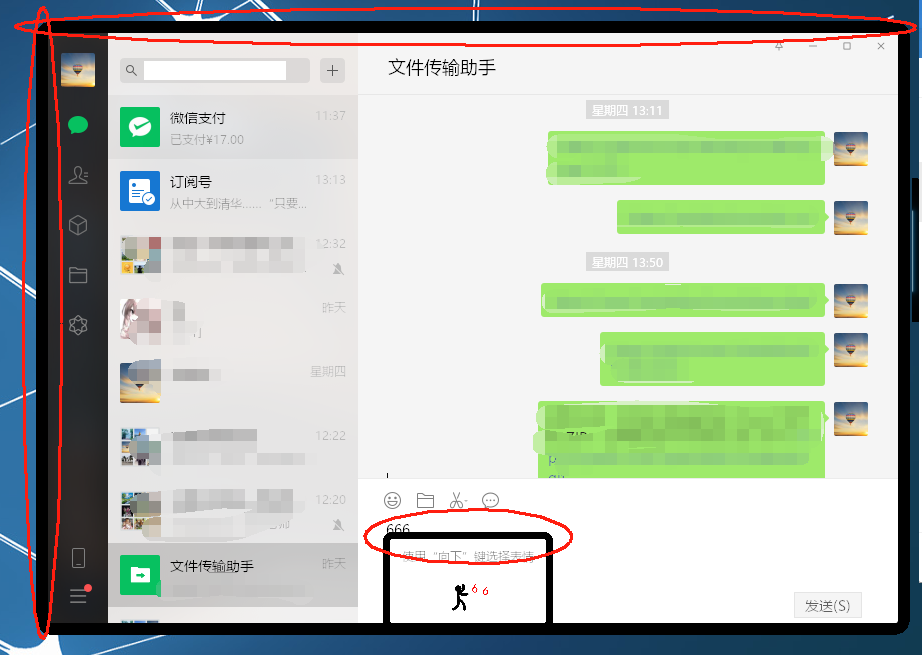
由于32位linux下没有微信,所以搞了wine来安装windows版的32位微信,能运行,能做基本聊天,但会有黑框:
试过网上搜的几个方法都没能消除黑框:
大家帮看下还有什么办法吗?
sars
2026 年8 月 22 日 06:32
3
就是怀旧一下,好多年没开机了,发现它还能跑winXP和antiX,而且这个antix26还有32位的,还能用testing的源。
用的什么桌面环境?运行picom这样的合成器了吗?
sars
2026 年8 月 22 日 09:37
5
依云:
用的什么桌面环境?
用的是antix26的zzz-icewm,32位的。
依云:
运行picom这样的合成器了吗?
这是什么?没有主动运行过。要安装什么吗?要怎样运行?
那你安装并运行picom试试。直接运行就行。它能把窗口的半透明部分和其下方的内容合成(composite)到一起。
sars
2026 年8 月 22 日 09:44
7
这个怎么用的?
$ picom
[ 2026年08月22日 17:40:46.990 sanitize_options ERROR ] Backend not specified. You must choose one explicitly. Valid ones are:
[ 2026年08月22日 17:40:46.991 sanitize_options ERROR ] 	dummy
[ 2026年08月22日 17:40:46.991 sanitize_options ERROR ] 	xrender
[ 2026年08月22日 17:40:46.991 sanitize_options ERROR ] 	egl
[ 2026年08月22日 17:40:46.991 sanitize_options ERROR ] 	glx
[ 2026年08月22日 17:40:46.991 session_init FATAL ERROR ] Failed to get configuration, usually mean you have specified invalid options.
[ 2026年08月22日 17:40:46.991 main FATAL ERROR ] Failed to create new session.
sars
2026 年8 月 22 日 10:09
9
这是不是要在哪个config文件指定的?直接picom egl是不行的。
$ picom glx
picom doesn't accept positional arguments.
sars
2026 年8 月 22 日 10:16
11
$ picom --backend glx
这样后那个黑框确实没有了,但变成不能输入了。我再试下别的选 项。
sars
2026 年8 月 22 日 10:28
12
$ picom --backend xrender
这个可以。那是要设置开机先执行这个?
sars
2026 年8 月 22 日 10:46
13
黑框消掉了,好看了很多。
一旦把微信最小化后这个阴影就没有了。
这个黑框框是已知问题。微信用来给窗口添加阴影的东西在Wine上就会变成这样子的。你可以参考一下这篇文章:
https://zhuanlan.zhihu.com/p/106926984
sars
2026 年8 月 22 日 12:09
15
wmctl和xdotool相关的有查到过一些,和这里描述的有点像,但还是没看得太明白。
我们可以在打开微信的情况下在终端输入xwininfo然后回车, xwininfo会让你用鼠标选取窗口, 然后输出这个窗口的详细信息.
选中阴影后我们可以查看窗口的window id, 在这里是0xae00014
这里我这只能选到微信窗口,选不到阴影。只能获取到微信窗口的ID。
这我就不清楚了。我当年是用打过补丁的wine来处理这个黑框框的。
sars
2026 年8 月 22 日 12:44
17
还是找不到阴影窗口ID,然后原样照着上面的python脚本写进去运行,发现没用。应该是这个脚本不能自动找阴影ID,要手工找到写进去才行:
shadow = id[:-4] + "0014"
sars
2026 年8 月 22 日 12:56
18
搞定了,原来脚本要改一下:中间那个break要注释掉。
#!/usr/bin/env python3
import time
import os
while True:
time.sleep(5)
exist = os.popen("ps -ef | grep WeChat.exe")
e = exist.readlines()
if len(e) < 3:
print(e)
print("WeChat not started. Exit...")
exit()
output = os.popen("wmctrl -l -G -p -x")
s = output.readlines()
print(s)
id = ''
for item in s:
if item.find("wechat.exe.Wine") != -1:
id = item.split()[0]
break #这个要注释掉!!!!!!!!!
output.close()
print(id)
if id != '':
shadow = id[:-4] + "0014"
print(shadow)
os.system("xdotool windowunmap " + shadow)
else:
print("WeChat not display yet.")
sars
2026 年8 月 22 日 13:14
19
哦还有前面的wechat.exe.Wine要改成自己的。
0x0380000c 3 21412 535 228 850 590 wechat.exe.wechat.exe dudu 微信
所以我的脚本改成这样就能用了:
#!/usr/bin/env python3

import time
import os

while True:
    time.sleep(5)
    exist = os.popen("ps -ef | grep WeChat.exe")
    e = exist.readlines()
    if len(e) < 3:
        print(e)
        print("WeChat not started. Exit...\n")
        exit()
    output = os.popen("wmctrl -l -G -p -x")
    s = output.readlines()
    print(s)
    id = ''
    for item in s:
        if item.find("wechat.exe.wechat.exe") != -1: #change to your own display
            id = item.split()[0]
            print("WeChat window was found\n")
            #break #???
        output.close()
        print(id)
        if id != '':
            shadow = id[:-4] + "0014"
            print("shadow window was found\n")
            print(shadow)
            os.system("xdotool windowunmap " + shadow)
        else:
            print("WeChat not display yet.\n")
break那个地方没想得太明白,但发现是要注释掉才有效。