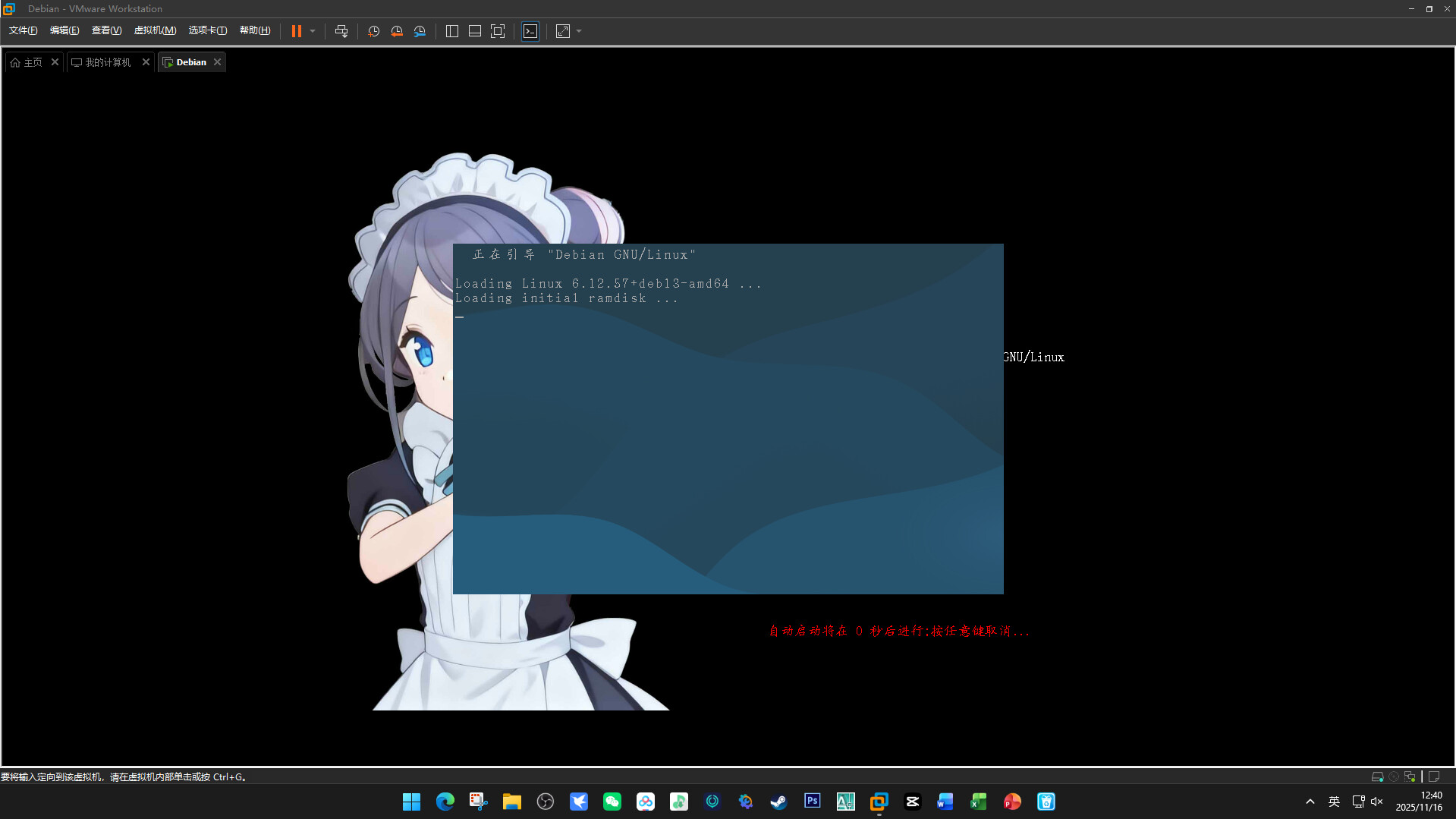
求助一下各位大佬,自己好不容易参照GRUB官方文档写好的GRUB主题在选择Debian系统并且进入时被Debian GNU/Linux 操作系统的启动引导界面挡住了,我想隐藏应该怎么办?
没玩过grub,但你是不是该把grub配置贴出来
是的谢谢提醒
GRUB theme
Global properties
desktop-image: “blackgroud.jpg”
title-text: “”
boot menu
- boot_menu {
left = 55%
top = 30%
width = 50%
icon_width = 32
icon_height = 32
item_icon_space = 10
item_height = 35
item_spacing = 5
item_font = “ukai_18.pf2”
item_color = “#ffffff”
selected_item_color = “#00ff00”
}
Countdown timer
- label {
id = “timeout”
left = 55%
top = 85%
font-family = “ukai_18.pf2”
font-size = 18px
color = “#ff0000”
horizontal-align = center
text = “Debian将在 %d 秒后进行 按任意键即可取消…”
}
解决方法
加上
desktop-color: “#000000”
terminal-left: “0”
terminal-top: “0”
terminal-width: “100%”
terminal-height: “100%”
terminal-border: “0”
用grub-customizer配置是以下